そのまま無料で使えます(Free 版)。Personal / Pro はライセンスキー入力で有効化。Works free out of the box. Enter a license key to unlock Personal / Pro.
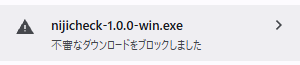
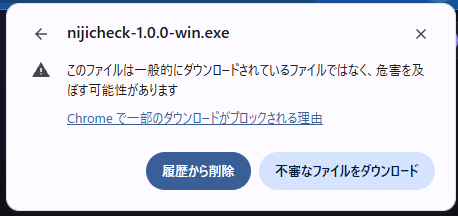
ダウンロード開始時のご注意:ボタンを押すと、ブラウザが「このファイルは危険な可能性があります」等の画面を出し、そのままでは保存がブロックされることがあります。新しく公開したツールのためダウンロード実績がまだ少なく、ブラウザに警戒されやすい状態です(実績が増えると自然に収まります)。表示・操作はブラウザによって異なります。以下は Google Chrome での例です。Before the download starts: your browser may show a screen saying the file "could be dangerous" and block the save by default. This is common for newly released tools with few downloads yet (these warnings fade as more people download it). The screen and steps differ by browser. Below is an example using Google Chrome.
① ダウンロード後、このような表示が出ることがあります。「>」をクリック① You may see something like this after downloading. Click the ">" arrow② 「不審なファイルをダウンロード」をクリックすると保存されます② Click "Download dangerous file" to save it
※ この前後に「ダウンロード保護を強化する」という別の案内が出ることがありますが、こちらは任意の機能紹介です。「利用しない」を選んで問題ありません。※ Chrome may also show a separate "Strengthen download protection" prompt around this time — that's an optional feature suggestion. It's fine to choose "Not now".
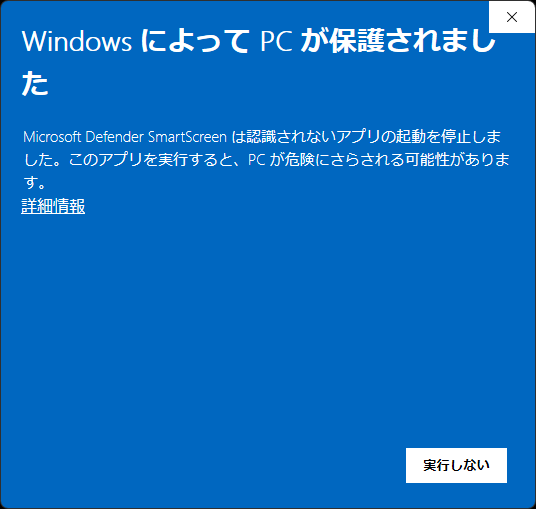
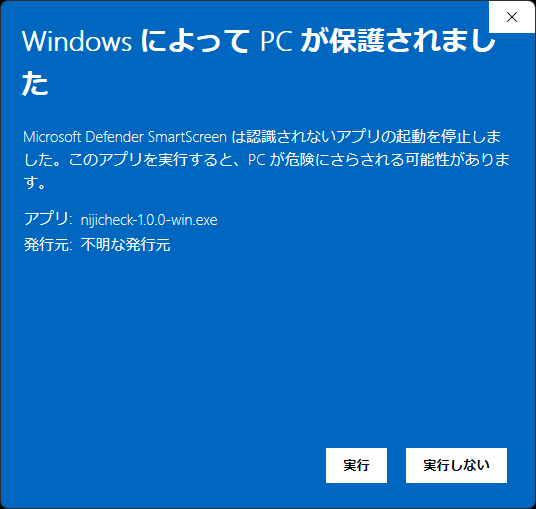
初回起動時のご注意:「WindowsによってPCが保護されました」(SmartScreen)が表示されることがあります。「詳細情報」→「実行」で起動できます。にじちぇくは完全ローカル動作で、通信は一切行いません。First launch: Windows SmartScreen may warn about an unrecognized app. Click "More info" → "Run anyway". nijicheck runs fully offline and never phones home.
① まず「詳細情報」をクリック① Click "More info" first② 「実行」ボタンが出るのでクリック② A "Run anyway" button appears — click it
🍎 Mac
準備中です。もうしばらくお待ちください。Coming soon.
プランについてPlans
Free:上のダウンロードだけで、そのまま使えます(画像4枚まで・出力に透かし)。 Personal / Pro:料金プランからBOOTHでライセンスキーをご購入ください。ソフトは同じもの=キーを入力するだけで有効化されます。
キーの入力前でも、初回起動から7日間はそのまま全機能をお試しいただけます。
Free: the download above works as-is (up to 4 images, watermarked output). Personal / Pro: purchase a license key on BOOTH via the pricing page. Same app — just enter your key.
Before entering a key, you get a full-featured 7-day trial from first launch.
更新履歴Release history
v1.0.2 2026-07-11
サイドバー下部のバージョン表示を修正(実際のバージョンと連動するように)。Fixed the version number shown in the sidebar (now reflects the actual build).
お試し期間中に表示される吹き出しが、ライセンスキー適用後も残ってしまう不具合を修正。Fixed the trial popover sometimes staying visible after a real license key was applied.
v1.0.1 2026-07-11
お試し期間中のバッジ表示を「Trial」に変更(残り日数はバッジにマウスを乗せると表示)。The badge now shows "Trial" during the free trial (hover it to see remaining days).
安定性の改善(コマンドライン起動時にクラッシュすることがある問題を修正)。Stability fix for a crash that could occur when launching from the command line.
v1.0.0 2026-07-10
初回公開。Initial release.
旧バージョンが必要な場合は、更新履歴の各バージョンからダウンロードできます。Older versions remain downloadable from this history.